

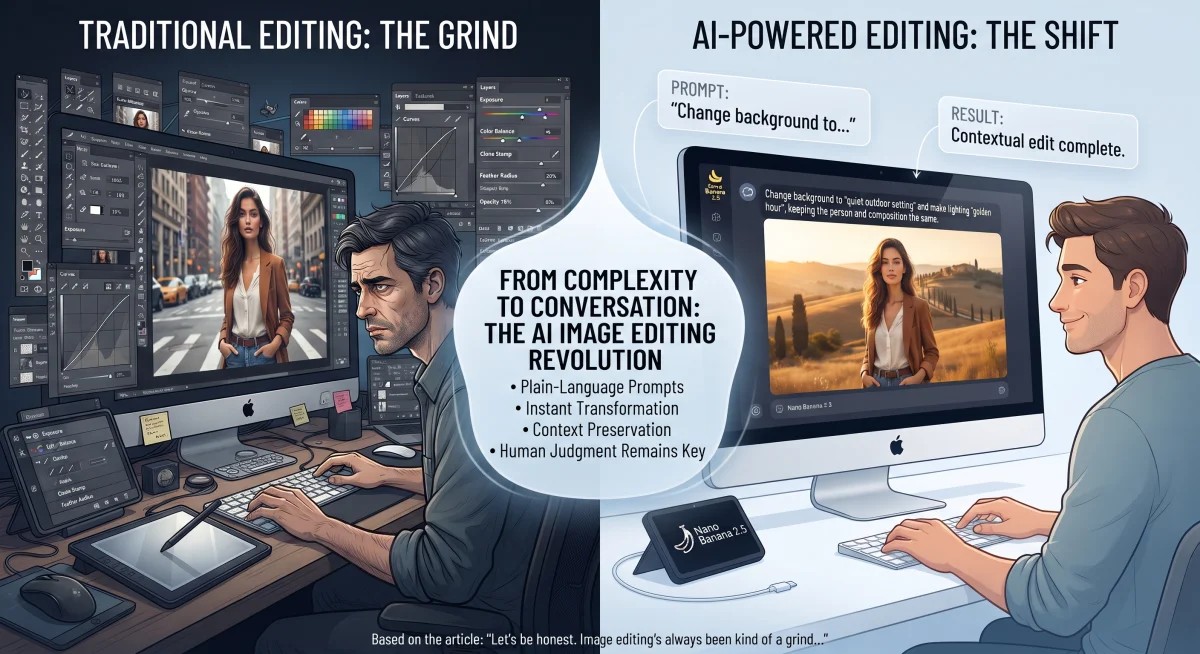
Let’s be honest. Image editing’s always been kind of a grind. You needed technical know-how. Tons of patience. And a sharp eye for detail. Fixing lighting. Removing random objects. Swapping backgrounds. Cleaning up tiny flaws. That could mean juggling a bunch of tools. And round after round of manual work. Exhausting, right? AI’s brought a totally different approach, though. You don’t have to control every single tweak yourself anymore. More and more, you just describe the change you want. In plain, everyday words.
And that shift? It’s making editing way more accessible. It’s also changing how people think about visual content. Photographers, designers, marketers. Students. Regular everyday users, too.
What Is AI-Powered Image Editing?
So what’s AI-powered image editing, really? It uses machine learning models to understand an image you already have. Then it makes changes based on your instructions. Easy. It’s not just slapping on some fixed filter, either. Nope. An AI system actually looks at what’s going on. People, objects, backgrounds. Colors, lighting, composition. Then it creates an edited version.
Picture this. You upload a photo. Then you ask it to remove some unwanted object. Or change the background. Or make the lighting warmer. The system reads your instruction. And boom, out comes a changed image.
That’s different from making an image from scratch, by the way. Image generation starts with nothing but an idea. It builds content from a description. AI editing? It usually starts with an image that already exists. Then it tries to keep the important stuff intact. While changing just the parts you asked about.
The Growing Role of Natural-Language Instructions
Honestly? One of the biggest changes in modern editing is using plain-language prompts. You don’t need to know the technical name of every adjustment. Or get your head around confusing editing jargon.
Forget manually messing with exposure, shadows, color temperature, and contrast. Just describe the result you want. In one sentence. Here’s the deal. That makes editing feel way more like a conversation.
Tools built around this can handle all sorts of instructions. Swapping a background. Changing a photo’s mood. Replacing an object. Or totally transforming the visual style. How good the result turns out? That often depends on your instruction. How clearly does it say what should change? And what should stay exactly the same?
Why Context Matters in AI Image Editing
A big part of AI editing is keeping context. Let’s say you remove an object from a photo. The system has to rebuild the area around it. And make it actually look convincing. Same goes for changing clothes or a background. The model has to understand how different parts of the image connect.
Modern image editors try hard to keep certain stuff the same. Facial features. Poses. Which way the light’s coming from. Perspective. The overall composition. But here’s the catch. These systems are generative. So sometimes they throw in details that were never in the original. Sneaky, right?
Exploring prompt-based workflows? A tool like a Nano Banana 2.5 image editor fits right into this bigger move. Toward instruction-based visual editing.
Common Uses for AI Image Editing
AI-assisted editing comes in handy in loads of situations. Personal photos are an obvious one. Maybe you wanna get rid of something distracting in the background. Or fix the lighting. Or get a photo ready for a certain format.
Businesses can use AI editing, too. For product images. Social media graphics. Ads and presentations. Other visual materials as well. Designers might use generated edits early on, while experimenting. That way they can try out several visual directions. Before diving into detailed manual tweaks.
There’s image adaptation, too. A photo made for one layout might need to fit another. A different aspect ratio. Or a different composition. AI tools can help stretch out or rearrange visual elements. But check the final result carefully, though. Don’t just trust it and move on.
Writing Better Prompts for Image Editing
Clear instructions usually make AI editing way easier to control. A good prompt points out exactly what needs to change. And it gives useful info about the result you want.
For example, don’t just say “make this better.” Not much to work with, right? Get more specific instead. Say the background should become a quiet outdoor setting. While the person, their clothing, and their face stay exactly the same. Way better.
It also helps to spell out what should be kept. Lines like “keep the original composition” work great. Or “do not change the person’s facial features.” That gives the system extra context. Trust me, it helps.
Got a complicated edit? Break it into smaller steps. You’ll usually get more predictable results. Don’t ask the AI to change lighting, background, clothing, objects, and composition all at once. That’s asking for trouble. Handle the big changes one at a time instead. You’ll have way more control.
Limitations Users Should Understand
AI image editing doesn’t replace your own careful eye. Not even close. Generated results can hide subtle mistakes. Warped objects. Shadows that don’t match. Changed facial details. Wrong textures. Or proportions that just look off.
Text inside images can be tricky, too. Signs, labels, product packaging. Other written stuff. It might change without warning during generation. For professional work, always check these details. Before anything gets published.
There’s the ethical and practical side as well. Editing a photo can change what it means. Especially in journalism or documentary work. Scientific communication. Or anywhere visual accuracy really matters. So ask yourself a quick question. Is this edit just a harmless creative tweak? Or does it create a misleading impression? Because that’s where it gets shady.
The Future of Digital Image Editing
So where’s all this heading? Toward a more instruction-based way of editing. Traditional editing skills still matter, sure. But now you’ve got another way to get your creative ideas across.
The smartest move? Probably mixing both. AI can handle the repetitive or exploratory stuff. But human judgment still matters a ton. For accuracy. Composition. Authenticity. And final quality.
As editing models keep getting better, the key skill might shift. It won’t be so much about knowing every single editing command. It’ll be more about knowing what you want visually. Describing it clearly. And judging the result with a critical eye. That mix of plain-language control and human oversight? It makes editing way more flexible. Without taking away the need for smart, thoughtful creative choices.