Close Menu
    Facebook X (Twitter) Instagram
    Facebook X (Twitter) Instagram LinkedIn TikTok
    Ohsem.me
    • Home
    • Top Categories
      • Reviews
      • Preview
      • Tech News
      • Consumer Electronics
      • E-Commerce
      • Wearables
      • Personal Development
    • Global News
      • PR Newswire
      • Globe Newswire
      • MarketersMEDIA
    • Lifestyle
    • Gaming
    • Contact Us
    • Follow Us
      • Subscribe to our newsletter
      • Follow us on Newswav
      • Follow us on Flipboard
      • Follow us on Feedly
    Ohsem.me
    Home»Tech & Gadgets»Google»Gmail Has A Fresh New Look, Here’s What I Think Of It
    Google

    Gmail Has A Fresh New Look, Here’s What I Think Of It

    08/06/2018No Comments3 Mins Read19 Views
    Gmail Has A Fresh New Look, Here's What I Think Of It
    Share
    Facebook Twitter LinkedIn Pinterest Reddit

    If you hadn’t noticed or have not checked your email yet, Gmail revealed a new look today. I was greeted with a message as soon as I logged into my Gmail account. It says, “Welcome. Your favourite email has a fresh new look”.  And true enough, it does.

    After clicking on the “Next” button, Gmail will ask whether you want to view your email in default view, comfort view or compact view. I choose default because I guess I’m used to that. These views were also available in the old Gmail UI.
    Gmail Fresh New Look

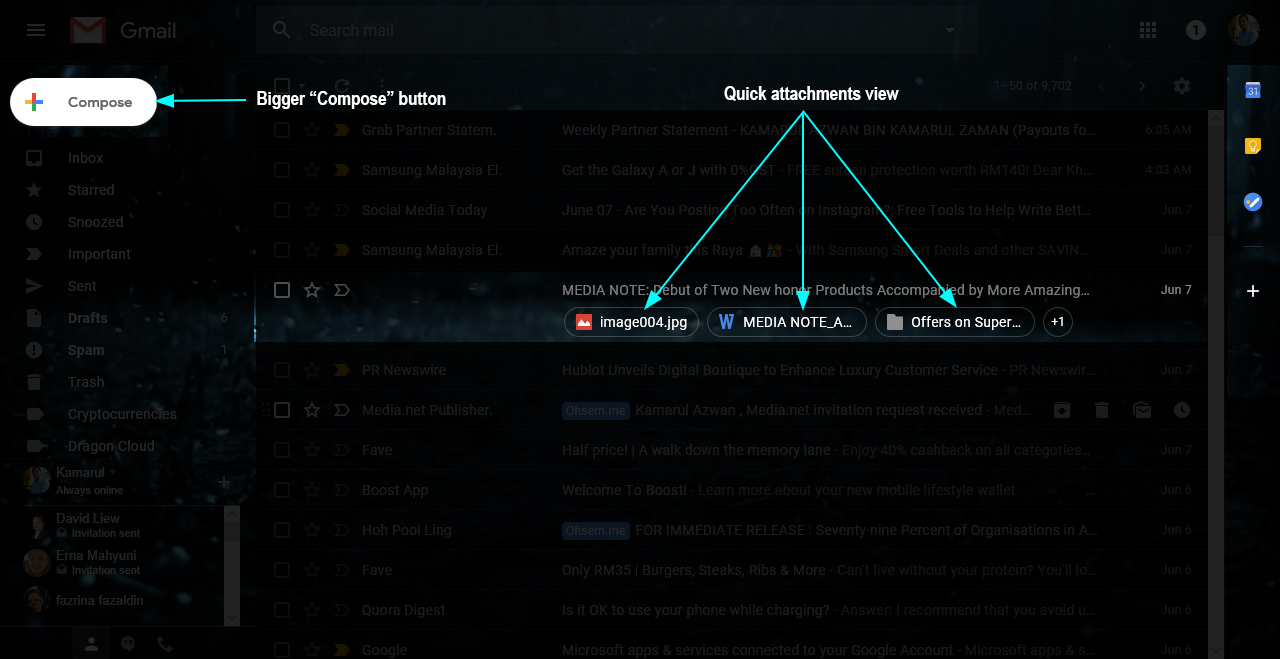
    The default view has a new twist. You can see any attachments to the email at first glance, meaning you don’t have to open the email to see the attachments (docs, pdf, jpeg, etc). I find that this function is much better in case if I want to see any attached documents quickly.

    Gmail Fresh New Look

    The second thing you will notice is the right side bar. This is where you can find the standard calendar button with two additional buttons available, Keep and Tasks. Both are also available in Android app so that you can sync your data easily. I use Keep all the time but since Gmail supports Tasks now and it’s available in Gmail itself, I installed the app on my phone immediately just to test it out.

    Gmail Fresh New Look

    True enough, it syncs well. Just like all the other Google apps.

    Another cool right sidebar feature is that you are able to add other “add-ons” to the sidebar. Other notable add-ons that you can have are Trello, Asana, Wrike and many useful work related apps.

    Gmail Has A Fresh New Look, Here's What I Think Of It

    As for the layout of the email itself, it is basically almost the same as the previous one but many of the changes are noticeable with bigger buttons and highlighted tick boxes/icons when you hover your mouse pointer over it.

    Google have also included the Snooze button for emails that you wish to read later. Simply open the email, and click on the Snooze icon (clock icon) at the top to keep it aside for the time being. You can manually set the time and date when you want it to reappear in your inbox as well.

    So that is basically my quick rundown of what I think about the new Gmail UI/UX for now. So far I’m liking it, but it’s not making me go “wow” just yet. Other than the right sidebar and the snooze button, it’s more or less the same. Oh… and the “Compose” button got bigger too. And still using the old themes.

    Ok, that’s all folks.

    email gmail
    Share. Facebook Twitter Pinterest LinkedIn Tumblr Reddit
    K. Azwan
    • Website
    • Facebook
    • X (Twitter)
    • LinkedIn

    Been a blogger for almost 20 years and highly passionate about technology, gadgets and food. Subscribe to this site for latest updates on tech and food reviews. Don't worry, I won't spam you.

    Related Posts

    Infinite Reality and Google Cloud Team Up for Immersive Tech

    Google 06/09/20243 Mins Read

    Google Pixel 9 Pros: What to Expect

    Google 23/08/20246 Mins Read

    Infinix, UNESCO, and Google Join Forces for Largest CogLabs Workshop

    Infinix 05/08/20245 Mins Read

    5 Best Ways You Can Keep Your Data Safe and Secured

    Google 02/10/20207 Mins Read

    Google Maps Know Where You Been To

    Google 18/08/20142 Mins Read
    Leave A Reply Cancel Reply

    POPULAR POSTS
    MarketersMEDIA

    New Breakthrough in Embodied Intelligence: X-Humanoid Wise KaiWu Agent Gives Robots Real Awareness and Real Capability

    10/05/20266 Mins Read195 Views

    Beijing, China, May 10, 2026 — On May 8, 2026, the Beijing Innovation Center of…

    Samsung Galaxy A37 5G Review: The Mid-Range Phone That Actually Fixes What Was Broken

    09/05/2026

    AiSwap Officially Launched: The Next-Generation Multi-Chain Aggregation Smart Trading Protocol Driven by AI

    24/04/2026

    realme C100i Review: The Battery Monster That Budget Phones Always Needed

    13/05/2026

    HONOR 600 Pro Review: Awesome AI Tricks Wrapped in a Familiar Face

    30/04/2026
    LATEST REVIEWS
    • realme C100i 5G
      realme C100i Review: The Battery Monster That Budget Phones Always Needed
      7.6
    • Samsung Galaxy A37 5G
      Samsung Galaxy A37 5G Review: The Mid-Range Phone That Actually Fixes What Was Broken
      8.2
    • HONOR 600 Pro
      HONOR 600 Pro Review: Awesome AI Tricks Wrapped in a Familiar Face
      8.6
    • Samsung Galaxy S26 Ultra
      Samsung Galaxy S26 Ultra Review: The Android King Gets Lighter, Smarter, and a Bit Sneakier
      8.7
    • OPPO Watch S
      OPPO Watch S Review: Starting from RM799, This Watch Has No Business Looking This Good
      8.7

    Subscribe to Updates

    Get the latest tech and gadget news from Ohsem.me straight to your inbox.

    Type above and press Enter to search. Press Esc to cancel.