

Being in today’s digital world, many of us have a presence online. Social media is extremely popular and almost 80% of the world’s population are connected in the cyberworld. Working life has been shifted from offline to online especially in 2020, all due to the current global Covid-19 pandemic.
I for one have worked from home during the recent lockdown and it was a tough period for many of us Malaysians. Keeping my work files safe is one of my main priorities. I have to work from home, and even at this moment, I still need to keep every single one of my work files in a safe environment.
I have had experiences before this where my home PC decided to die on me. I have lost thousands of data and pictures before this. I used to be a photographer. So having a backup for all my photos is extremely crucial. So I have been wondering where and how can I keep all my data safe and secure.
With this, I have come up with 5 best ways to keep your data safe and secured while dealing with the current times.
Have a secondary internal/external disk as backup

This method has been used many times. But with the current technology, data can be stored safely and securely with encryption. Hard disk manufacturers have managed to create secured storage for consumers so that you can store your precious files without having to worry about prying eyes.
Best of all, the encrypted drives are guaranteed to last you a very long time, thanks to it being an SSD drive instead of the traditional HDD drives. SDD have no moving parts. Therefore, manufacturers are confident enough to give a 5 year warranty and guaranteed to last you for more than 10 years of use. It is also highly durable and light. I use this method of backup all the time to keep my data safe and secured.
Create a clone disk

Saving files on a hard disk is fine when you’re just backing up data. But what if your old hard disk simply gives up? You can’t turn on your PC, you can’t do anything.
Creating a clone of your hard drive is one of the best ways to keep your data intact. A cloned drive is an exact replica — no compression — of the original drive that can be used to boot a PC. For example, if you clone your internal hard drive to a USB external drive, you can plug it in, choose to boot from USB through BIOS, and run Windows from the external drive. It’s that simple. But the process of cloning your hard disk will take a long time and bore you out. But it is worth it. You can Google up on how to clone a HDD.
Build a NAS system
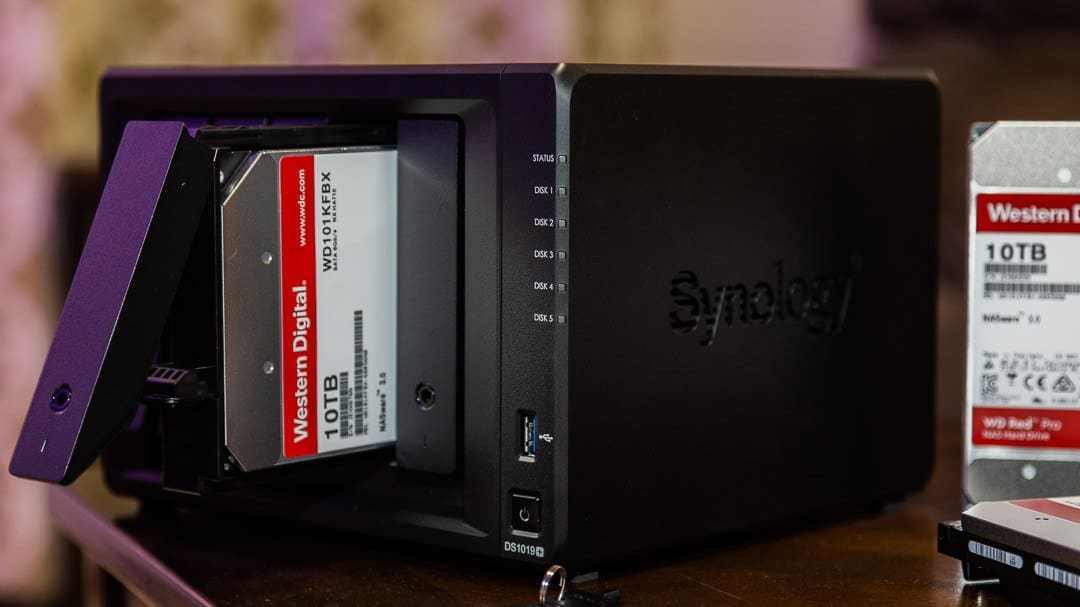
This has got to be the most expensive method of all. But most servers are using this and it is the best way to store and save your data. It is expensive because you have to invest in a network server to store all your data. You may have to spend hundreds, if not thousands more for this.
Here’s why: Network Attached Storage (NAS) is a group of drives (you can also find single-drive NAS) that is connected via a network. Any users on the network can technically access the NAS, and for this reason, they are perfect for backing up multiple computers at once.
Depending on the NAS you go with, say a RAID 5 setup, you can create a system that will retain your backed-up files even in the event of a drive failure in your PC and in the NAS. Going with this method is sort of like creating your own cloud storage in your home.
Using a thumb drive

Wait what? If you think a thumb drive is only for transferring data from your PC to your friend’s laptop, think again. A thumb drive, preferably a minimum of 64GB, is very useful when it comes to backing up your important files. Thumb drives are very durable and some of them are even water/weather proofed. If you’re storing basic word documents, few Photoshop files and even a few hundreds of photos, a single thumb drive will still be able to hold it all.
So a thumb drive is also the best device for you to keep your files safe quickly. But a thumb drive is small. So you will tend to lose it if you’re not careful. I know because I have lost a few. Still, don’t leave this one out if you want a quick backup.
Sync with Google Drive

Since we are living in the new digital era, why not make full use of it? Cloud storage is becoming a norm for many large corporations and SMEs alike. Even me as a freelancer is partly dependent on cloud services. We all have Google accounts. When we register with Google, we have already automatically signed up with their cloud services. Gmail, Drive, Calendar, Photos…everything is in the cloud. All my files in my laptop are synced with Google Drive directly. This provides a total peace of mind for me.
But what if you need something extra than just their basic free services? That’s when G Suite plays a role. With G Suite, you can use your own domain for the email address and increase your online storage so that you can sync all your important data safely.
G Suite is a set of cloud computing, productivity and collaboration tools, software and products developed by Google. G Suite comprises of Gmail, Hangouts, Calendar, and Meet for team communication; Drive for storage; Docs, Sheets, Slides, Keep, Forms, and Sites for productivity and collaboration. More services have been added during the recent times making it more suitable for smaller businesses to adopt their cloud services.

We know that these services are free to use for basic consumers, but G Suite adds enterprise features such as custom email addresses at a domain (@yourcompany.com), option for unlimited cloud storage (depending on the plan and number of members), additional administrative tools and advanced settings, as well as 24/7 phone and email support.
While this may sound expensive on your part, it is actually quite affordable when you sign up to G Suite with the local Malaysian G Suite provider or from the Singaporean G Suite provider. These reseller services are provided by a company called TS Cloud. TS Cloud will also charge the fee using local currencies for the quotes and invoices which also benefits the withholding tax exemptions.
Also, TS Cloud is a Google Premier Partner in Malaysia so the reliability and affordability is within reach. Having said that, TS Cloud is also a Google Premier Partner in Singapore as well. So now you can have the best affordable solution from both countries.
I have been using G Suite for quite a while now because a few companies that I was attached to are using the service. All I can say is that it’s simple, familiar and cheap. Highly recommended if you’re looking into a single reliable cloud platform that does it all. That is one way that I can keep my data safe and secured
Check out the TS Cloud websites below for more info:

Malaysia – https://tscloud.com.my/gsuite
Singapore – https://tscloud.com.sg/gsuite